
Understanding account statuses
AdminWhat Pending, Active and Expired mean in the Admin tab.
Account statuses tell you what stage a user is at in the onboarding process. They reflect a user's actions after an invitation to join the WethosAI platform has been sent.
You can find this information on the Admin tab within your profile. Please note this status does not represent active subscription and is separate from license and subscription status which can be found by clicking the three dots on the far right side.
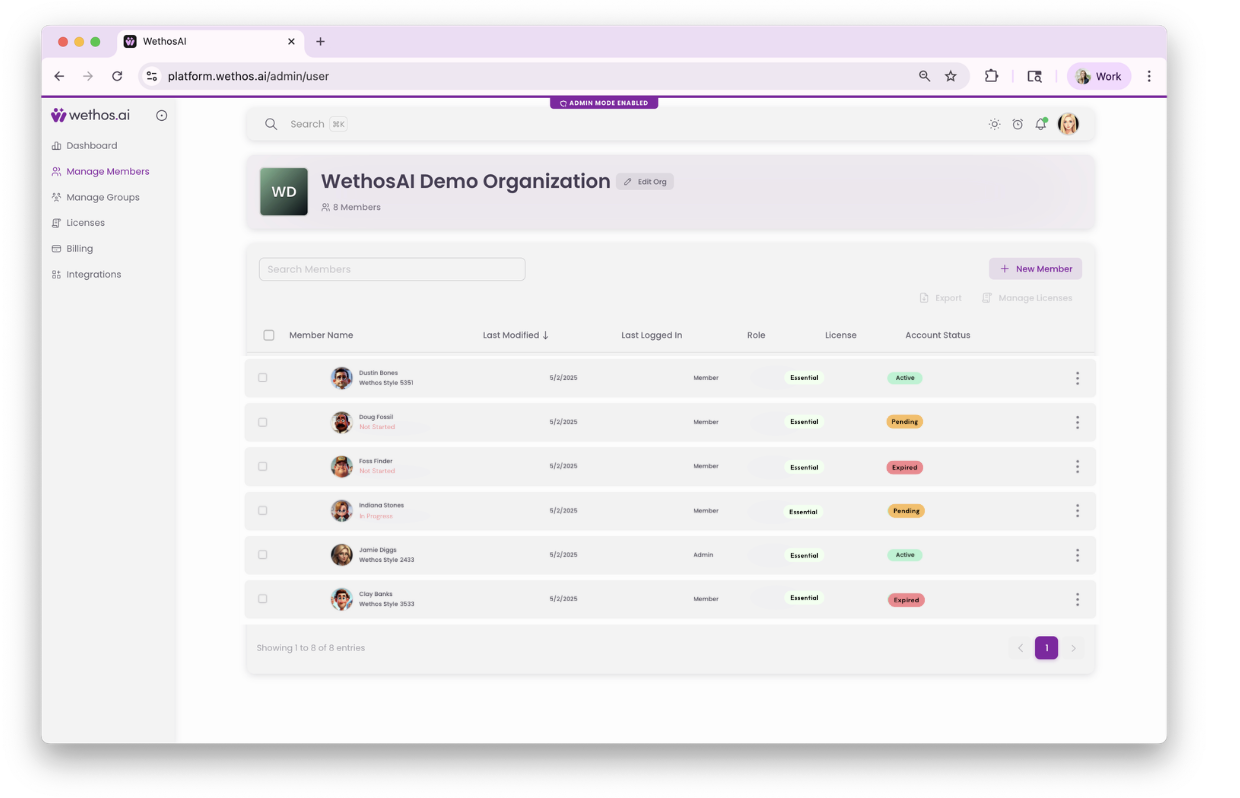
Account status definitions
Expired
If a user does not log in within 14 days of an initial invitation or reactivation email, their status changes to Expired. This means they will need a new invitation to gain access to the platform. To resend a reactivation link, follow these instructions.
Pending
This status means a new invitation has been sent to the user, or their account has been sent a reactivation link. The user hasn't yet logged in to the platform.
Active
When a user successfully logs in, their status becomes Active. This means they've set up their account and accessed the platform. This status remains even if their paid subscription expires. Subscription licensing is managed separately; click the three dots on the right hand side and select Edit to check the user's current subscription details.
Additional user tags
In addition to the Account Status, you might also see these tags under a user's name:
Not Started: The user has logged in but has not begun setting up their profile.
In Progress: The user has started setting up their profile but has not finished.
*Account Statuses indicate whether a user has completed the steps to join the platform after being invited, not if they have an active subscription.